
Your PC Has a June 2026 Deadline You Don’t Know About
The Invisible Deadline
You may have opened the Windows Security app on your computer recently and noticed something new under “Device security.” A colored badge next to Secure Boot that wasn’t there a few weeks ago. Maybe it’s yellow. Maybe it’s green. Maybe, unfortunately, it’s red. Most people have never poked around in that section of their settings, so the badge alone probably doesn’t tell you much.
That badge is Windows trying to tell you that the security certificates your computer has depended on since the day it left the factory are about to expire. The original certificates were issued back in 2011, and the first set runs out in late June 2026. That’s roughly ten weeks from when this article goes live. Your PC won’t stop working when that date hits. It’ll still boot up, still run Windows, still install your regular updates, but it’s going to quietly lose a layer of protection that matters a lot more than most people realize.
This isn’t some hypothetical, might-happen-someday scenario. There’s a real malware toolkit out there, confirmed by security researchers and serious enough that the NSA published a dedicated mitigation guide for it. It targets exactly the kind of gap that expired Secure Boot certificates leave open. It works below the level where your antivirus can even see what’s happening. More on that in a minute.
What Secure Boot Does
Secure Boot is a security feature built into your computer’s firmware, which is the low-level software that runs before Windows even starts loading. The simplest way to think about it: Secure Boot is a gatekeeper. Every time your computer turns on, it checks the digital credentials of each piece of software that tries to load during startup. Credentials that match a set of trusted certificates stored on your motherboard get cleared to run. Everything else gets blocked.
The reason this matters is that malware loaded before Windows loads is in an incredibly dangerous position. Malicious code running at that stage of startup can disable your antivirus, bypass your disk encryption, and shut down your security tools before any of them are even awake yet. Your security software can’t catch something that was already running when it booted up. It’s the difference between a burglar breaking in while the alarm is armed versus one who was already inside the building before anyone turned the system on.
Secure Boot has been running quietly on most PCs since around 2012. It’s not something the average person needed to think about. It just works in the background. Secure Boot relies on cryptographic certificates, and like a driver’s license, those certificates have expiration dates.
Have you ever checked whether Secure Boot is enabled on your computer? Most people haven’t. Honestly, that’s been fine up until now, because there was never a reason to look.

Figure 1: Secure Boot settings within the ASRock UEFI BIOS menu, showing the toggle set to “Enabled” while the status remains “Not Active.”
What’s Happening in June 2026
The certificates Secure Boot depends on were issued in 2011. Fifteen years ago. They were always designed to expire eventually, and that “eventually” is now about ten weeks away. The first one, the Microsoft Corporation KEK CA 2011, goes in late June 2026. The rest follow through October, including the certificate that signs the Windows bootloader itself.
Microsoft has been working on this for a while. They’ve created replacement certificates, called the 2023 CAs, and they’ve been pushing them out through Windows Update. PCs built since 2024 probably already have them. Modern hardware running current Windows updates should see the transition happen automatically, without anyone lifting a finger.
For other machines, it gets more complicated. Some devices need a firmware update directly from the manufacturer (Dell, HP, Lenovo) before the new certificates will stick. Some older hardware may not support the update at all. The part that trips people up is that the consequences of missing this deadline are completely silent. Your computer still turns on. Windows still runs. Updates still install, but that early boot process, the layer between your motherboard and the operating system, stops getting security updates. It’s frozen in time while new threats keep evolving around it.
An analogy that might help: imagine a building where the locks on the front door still work fine, but the security desk in the lobby stops checking IDs. Anybody who slips past that desk has free run of the building before the alarm system on the upper floors even kicks in.
Why This Isn’t Just Theoretical
In early 2023, security researchers at ESET published the first public analysis of a bootkit called BlackLotus. It was the first malware of its kind ever confirmed to bypass Secure Boot on a fully updated Windows 11 system. It had been selling on hacking forums for $5,000 per license since at least October 2022. That price point is significant. Five thousand dollars puts this kind of tool well within reach of organized criminal operations, not just nation-state spy agencies.
The capabilities are worth pausing on. Once installed, BlackLotus can disable BitLocker drive encryption, turn off Windows Defender, bypass other OS-level security protections, survive a complete Windows reinstall, and stay invisible to standard antivirus tools the entire time. The NSA’s own mitigation guide acknowledged the confusion around the threat, noting that some organizations were treating it as unstoppable while others assumed existing patches had already solved the problem. Neither characterization was quite right.
The connection to certificate expiration is direct. Microsoft’s IT Pro Blog post on the 2023 certificate rollout specifically names BlackLotus and the unsecured boot path as the reason these updates matter. Without current certificates, your PC can’t receive the revocations needed to block the kind of boot-level exploits that BlackLotus uses. The door stays open.
One important caveat, because getting this right matters: BlackLotus requires the attacker to already have administrator-level access to your system. It doesn’t spread on its own through email or web browsing. It’s what an attacker deploys after they’ve already gotten in, to make sure you can never fully get them out. So, standard security hygiene still matters. Strong passwords, multi-factor authentication, not clicking suspicious links. Those are your first line of defense. Secure Boot is the second. You need both.
How to Check Your PC Right Now
This takes about sixty seconds. Open the Windows Security app (just search for “Windows Security” in the Start menu), go to Device security, and look for the Secure Boot section. As of this month, Microsoft has rolled out color-coded badges that show your certificate status at a glance.
A green checkmark means your device has the updated certificates and the new Boot Manager installed. You’re in good shape. One small note: read the text next to the badge, too. You want it to specifically say that all required certificate updates have been applied. The green icon by itself isn’t always the complete picture.
A yellow caution badge means something still needs attention. Usually, this means Windows Update hasn’t finished delivering the certificate yet, or your PC is waiting on a firmware update from the manufacturer. Check for pending Windows updates first. When that doesn’t clear things up, head to your manufacturer’s support page. Dell, HP, and Lenovo have all published specific guides and compatibility lists for this transition.
A red badge means your device can’t receive the new certificates in its current state. That’s the most serious scenario, and one worth bringing to an IT professional before June.
No Secure Boot section visible at all? Your Windows version might not have the update that displays the badge yet, or Secure Boot might be disabled entirely. You can check manually: press Windows key + R, type msinfo32, hit Enter, and look for “Secure Boot State” in the System Information window.
Windows 10 users without Extended Security Updates are in a trickier spot. Microsoft won’t deliver the new certificates through Windows Update for unsupported Windows 10 installs. The options are enrolling in ESU, upgrading to Windows 11 on compatible hardware, or accepting that boot-level security will degrade after June. Not sure which bucket you fall into? That’s exactly the kind of thing a quick assessment can sort out.
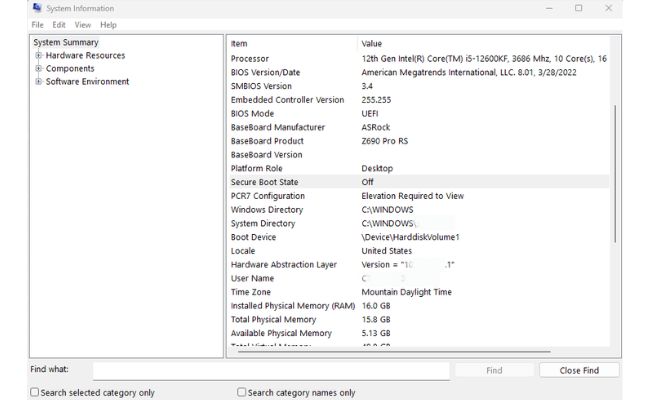
Figure 2: Opening ‘msinfo32’ allows you to see if your Secure Boot State is ‘Off,’ even if your BIOS Mode is set to ‘UEFI.’
What Business Owners Need to Know
For a household with one or two computers, checking Secure Boot takes five minutes. For a business with ten, twenty, or fifty machines spread across an office, it’s a fundamentally different problem. You’ve got mixed hardware from different manufacturers, machines of different ages, different operating systems, some devices that someone manages centrally, and others that kind of just… exist. The complexity adds up fast.
A few details make this especially tricky in business environments. The new Windows Security badges are disabled by default on enterprise-managed devices. Your IT admin has to go turn them on. Some machines need manufacturer firmware updates that Windows Update can’t deliver on its own, which means somebody has to coordinate with Dell, HP, or Lenovo. Virtual machines and BitLocker-encrypted devices each have their own quirks. Any Windows 10 machines that aren’t on Extended Security Updates are on a completely different track.
So here are some honest questions. Do you know how many devices in your office are still running Windows 10? Do you know which ones are enrolled in ESU? Has anyone verified that your PCs’ firmware is current? Is there a person in your organization whose job it is to track infrastructure deadlines like this one?
Most small businesses without a dedicated IT staff can’t answer those confidently. That’s completely normal. It’s also exactly the kind of invisible infrastructure work that a managed IT provider handles before it ever becomes your problem. You find out about the issue when it’s already being resolved, not when something breaks.
What Bristeeri Is Doing About This
For our managed IT clients, this work is already underway. We’ve been inventorying Secure Boot certificate status across client environments, coordinating firmware updates with manufacturers, and making sure devices are squared away well before the June deadline. Nobody should be learning about this from a yellow badge on their screen.
For our residential service plan customers, Secure Boot certificate status is now part of routine system health checks. Devices that need attention get flagged and handled.
For everyone else, whether you’re a homeowner in the Midlands with a PC you’re not sure about or a business owner who just realized nobody on staff is tracking this, we’re offering a free Secure Boot assessment. Bring your computer in or schedule a remote session. We’ll check your certificate status, tell you where things stand, and walk through your options. No strings attached.

Check Before June
June 2026 is about ten weeks out. The update is straightforward for most people, but only when someone takes the time to look. Not sure where your computer stands? Get in touch, and we’ll check it for free.
For businesses with multiple machines, a fleet-wide Secure Boot assessment tells you exactly which devices need attention and what each one requires. That kind of work is a whole lot easier to handle now than to untangle after the deadline passes.